Most security leaders I talk to have stopped asking whether their employees use unapproved AI tools. They already know the answer is yes. The question now is how much, where, and what data has already gone out the door. A 2024 Cyberhaven report found that 27% of the data employees put into AI tools was sensitive, up sharply from the year before.
That is the shadow AI problem in one number. It is not a small group of rule-breakers. It is a normal workday, happening on personal accounts, inside browser tabs your monitoring never sees. This guide covers what shadow AI is, why it grows, the risks it creates for business owners, and how to bring it under control without killing the productivity gains employees are chasing.
If your teams are building or piloting AI capabilities, our work in AI enablement usually starts with the same visibility gap this article is about.
Key takeaways
- Definition: Shadow AI is any AI tool, model, or workflow used inside a company without IT or security approval.
- Scale: Roughly 27% of data pasted into AI tools is sensitive, according to Cyberhaven's 2024 usage data.
- Intent: Most shadow AI is not malicious. It is employees moving faster than the approved tooling allows.
- Bans backfire: Banning AI tools does not stop the behavior. It moves it to personal devices and personal accounts.
- What works: Real control comes from visibility, a short list of approved tools, and a review process that takes days, not months.
What is shadow AI?
Shadow AI is the use of AI tools, models, or AI-powered features inside an organization without formal approval from IT, security, or compliance. A marketer pasting a client brief into a free ChatGPT account to summarize it is shadow AI. So is an engineer running an open-source model on a laptop to generate test data.
The defining trait is invisibility. Leadership does not know the tool is being used, which means no one has checked how the vendor stores data, whether prompts are used for training, or what happens if the account gets compromised.
Shadow IT vs Shadow AI: what's different
Shadow IT is the older, broader category. It covers any unsanctioned software or service, from a team paying for Trello on a personal card to someone spinning up an AWS account outside procurement.
Shadow AI is a subset with its own problems, as once data goes into an AI system, it can be absorbed into model behavior, cached for training, or reproduced later in ways nobody can predict. Traditional shadow IT usually stores data. Shadow AI often learns from it.
Why shadow AI is growing so fast
The pace of adoption is not really about AI itself. It is about a mismatch between what employees can do at home and what they are allowed to do at work.
ChatGPT, Claude, Gemini, Perplexity, Midjourney, and dozens more are available with a personal email. No procurement, no security review, no waiting. If a tool helps someone finish a task in ten minutes instead of two hours, they will use it.
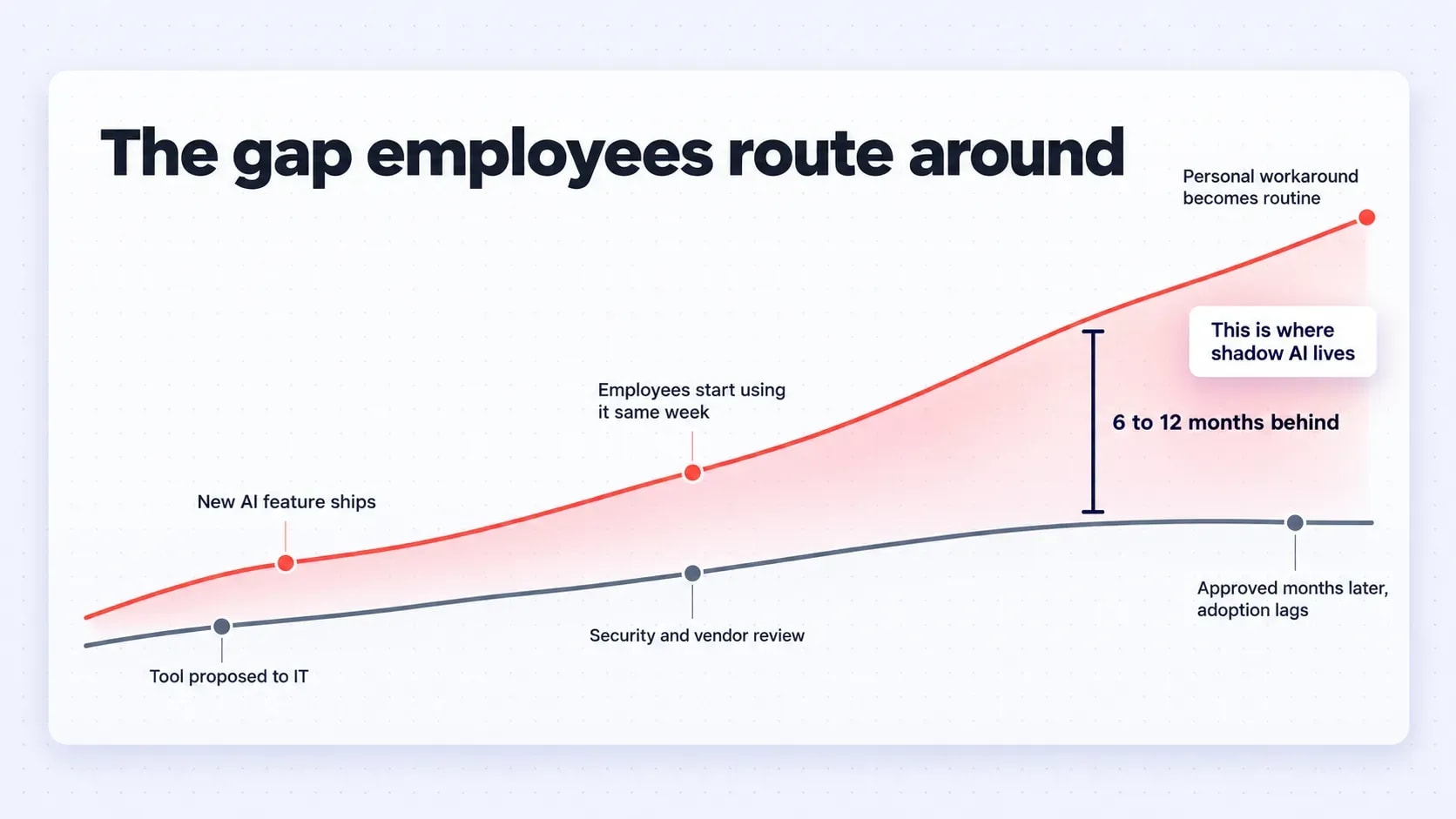
Most company AI rollouts lag consumer tools by six to twelve months. Employees notice. When the sanctioned option is worse than what they can get for free, they route around it. By the time the approved tool ships, the workaround habit is already set and hard to unwind.
AI policies barely exist
A 2024 ISACA survey found that only 15% of organizations had a formal AI policy in place. That is a policy vacuum, and employees fill it with their own judgment. Without a written policy to point to, nobody feels like they are breaking a rule, because there is no rule on record.
Notion, Slack, Zoom, HubSpot, and Grammarly have all added AI features. Employees turn them on without realizing they are sending meeting transcripts or CRM notes to a new processor.
Pressure to show productivity gains
Managers are being told to use AI. When their teams do not have approved options, they build their own with whatever is available. Those homegrown tools rarely go through a security review before they end up handling real work.
How shadow AI shows up by department
Shadow AI looks different depending on who is using it and what data they handle every day. Recognizing each department's patterns makes detection easier, because the tools, the shortcuts, and the data at risk all change from team to team.
Engineering and development
Developers use AI code assistants (both approved and unapproved), paste snippets of proprietary code into public chatbots to debug them, and pull open-source models from Hugging Face without review. Samsung's 2023 source code leak started this way.
- Debugging in public chatbots: A developer stuck on a bug pastes the failing function, including internal variable names and business logic, into a free AI tool because it is faster than searching internal documentation.
- Unreviewed open-source models: Engineers pull a model from Hugging Face to prototype a feature, skipping the security review that vetted the company's approved model providers.
- Coding assistants outside license terms: Teams install a code assistant's free tier on company laptops without realizing its data-handling terms differ from the paid plan IT approved elsewhere.
Data and analytics teams
Analysts upload spreadsheets and query results to AI tools for faster analysis. The data often includes customer records, revenue figures, or model outputs that were never meant to leave the environment.
- Spreadsheet uploads for quick summaries: An analyst uploads a customer export to an AI tool to get a fast summary instead of waiting for a formal reporting cycle.
- Raw query results pasted into prompts: SQL output with account-level detail gets pasted into a chatbot to explain a trend in plain language.
- Model outputs repurposed without review: Internal predictive results get fed into an AI tool to draft a client-facing summary, skipping the review that would normally catch a sensitive figure.
Marketing and sales
Marketing teams generate copy, images, and campaign concepts with unapproved tools. Sales reps use AI writers to draft outbound emails, sometimes feeding in prospect lists or call transcripts.
- Prospect lists fed into AI writers: A rep pastes a spreadsheet of leads into an AI email tool to personalize outreach at scale, unaware the list now sits on a third-party server.
- Call transcripts summarized externally: Reps run recorded call transcripts through AI note-takers that were never checked against company data policy.
- Campaign assets built outside brand tools: Marketers generate images or copy in free AI tools because the approved creative suite has no AI features yet, creating licensing and brand risk nobody signed off on.
Product and strategy
Product managers use AI to summarize research, draft PRDs, and analyze competitor pricing. Strategy documents and roadmap material often end up in personal AI accounts. Unreleased product plans in the wrong hands are worth more to a competitor than most other data in the company.
- Research synthesis in personal accounts: A PM summarizes user interviews or competitor research in a personal AI account because it is quicker than the approved in-house tool.
- Roadmap drafts shared for tightening: Draft PRDs and launch timelines get pasted into a chatbot for editing, putting pre-launch plans outside the company's control.
- Pricing analysis handled ad hoc: Competitive pricing data gets run through AI tools for quick comparisons, with no record of what was shared or where it went.
HR and finance
HR uses AI resume screeners and interview note takers. Finance uses AI to speed up reporting and forecasting. Both categories touch some of the most regulated data in the company, which turns an ordinary shortcut into a compliance incident fast.
- Resume screening without a data agreement: HR runs candidate resumes through an AI screener that was never checked for how it stores or reuses applicant data.
- Interview notes captured by AI tools: An AI note-taker joins interviews and records candidate details outside HR's system of record.
- Forecasts built with unapproved tools: Finance pastes revenue or margin figures into an AI tool to speed up a forecast, sending regulated financial data to a vendor with no data agreement in place.
Common shadow AI examples
Beyond the department view, a few specific tools show up in almost every audit:
- Personal AI accounts: Employees log into ChatGPT, Claude, or Gemini with a personal email and use it on a work laptop for real tasks. Whatever gets pasted in, from client details to internal notes, now sits on an account IT has never reviewed.
- Unapproved AI note-takers: Tools like Otter, Fireflies, or Read.ai join calls and transcribe everything said, often invited by a single attendee. Sensitive discussions, from pricing to personnel matters, end up stored on a vendor's server with no one checking the terms.
- AI browser extensions: Free extensions add AI features directly into Gmail, Google Docs, or Salesforce with one click to install. They read and process whatever the employee is working on, often with permissions far broader than the feature needs.
- Unlicensed coding assistants: Developers install a coding assistant's free or personal tier on a company machine to speed up their work. The data-handling terms on that tier are usually different from the company-wide agreement the business thinks it is covered by.
- Employee-built agents: Employees stitch together custom GPTs or small agents using company documents and workflows as training or reference material. Nobody outside the person who built it knows what data went in or what the agent is now able to access.
- Embedded SaaS AI: Tools like Notion, Slack, or HubSpot ship with AI features that get switched on by default or with a single toggle. Employees start using them without realizing meeting transcripts or CRM records are now being sent to a new AI processor.
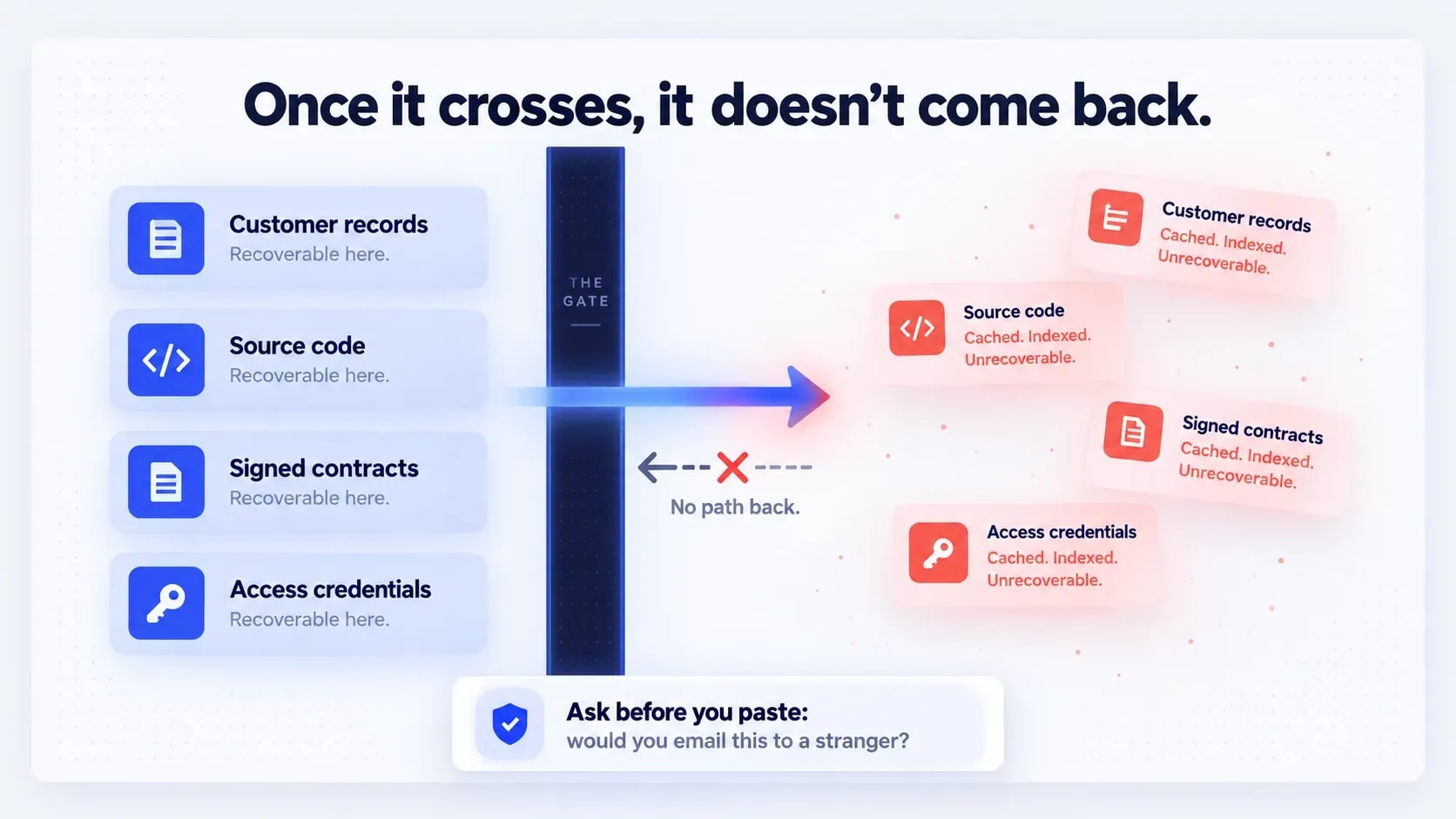
Every AI usage policy needs a memorable list of what stays out of AI tools that have not been reviewed. Employees will forget most policy details, so this is the part worth repeating. If nothing else sticks, this should:
- Customer personal data (names, emails, addresses, IDs)
- Payment and financial account data
- Source code, algorithms, and proprietary technical documentation
- Passwords, API keys, and access tokens
- Contracts, legal correspondence, and M&A material
- Health-related data covered under HIPAA or equivalent rules
- Anything labeled confidential, restricted, or internal-only
A useful rule for employees: if you would not email it to a stranger, do not paste it into a free AI tool.
What are the risks of shadow AI?
The risks split into a few clear categories, and business owners feel them differently depending on industry and geography. A healthcare company worries most about patient data, a software firm about source code, but every category below applies to both.
Data leakage and privacy exposure
When employees paste sensitive information into a consumer AI account, that data leaves your control. It may be stored, reviewed by the vendor's staff, or in some cases used to improve the model. Once it is out, you cannot pull it back.
Cost of getting caught
This is where the cost gets real. IBM's 2024 Cost of a Data Breach Report put the global average breach cost at $4.88 million, with regulated industries running much higher.
Regulatory and compliance exposure
Three frameworks come up in almost every AI governance conversation:
- GDPR: Applies to any processing of EU residents' personal data. Sending that data to an AI vendor without a proper data processing agreement is a violation.
- EU AI Act: Entered into force in August 2024 and applies in phases. Prohibited practices and general-purpose AI rules already apply, transparency obligations took effect in August 2026, and a 2026 amendment moved most high-risk obligations to December 2027 and August 2028. It applies to any company offering AI-driven products in the EU.
- NIST AI Risk Management Framework: Increasingly used by US regulators and auditors as a benchmark for reasonable AI governance.
None of these require perfection. They do require that you know what AI is being used and can show you have controls in place.
Expanded attack surface
Every unapproved AI tool is another account, another set of credentials, and another vendor with access to your data. Attackers know this. A compromised AI account exposes its entire stored chat history, including anything confidential ever pasted into it.
Biased or inaccurate outputs
AI tools hallucinate. In 2023, two New York lawyers were sanctioned after submitting a legal brief with fake case citations generated by ChatGPT. Similar mistakes happen quietly in marketing copy, financial models, and hiring decisions every week.
Loss of accountability and audit trail
If a decision was influenced by an AI tool nobody knew about, there is no way to reconstruct what happened. That breaks compliance audits, legal discovery, and internal investigations. When the question "why did we do this" has no answer, the company is left defending a decision it cannot actually explain.
When shadow AI becomes an agentic AI problem
The next wave is harder. Employees are now building small agents that can take actions, not just answer questions. An unsanctioned agent with access to email, calendars, or internal APIs can move data around, trigger workflows, and call other tools automatically.
If the agent was built on a personal account with broad permissions, a single compromised credential can cascade across systems. This is the point where poor guardrail decisions compound. Retrofitting access controls into an agent already running in production is far harder than designing them in from the start, which is why guardrails belong in the first sprint of any AI agent development project.
Real-world cost of shadow AI
A few incidents have become reference points:
- Samsung, 2023. Engineers pasted semiconductor source code and internal meeting notes into ChatGPT. The company banned generative AI on company devices shortly after.
- Mata v. Avianca, 2023. The lawyers who cited fabricated ChatGPT cases were fined $5,000 and became a cautionary tale cited in bar association guidance across the US.
- Air Canada, 2024. A tribunal ruled the airline was liable for incorrect information given by its chatbot, forcing it to honor a bereavement fare policy the bot invented.
The IBM figure above, $4.88 million average breach cost, is the number to keep in mind when someone asks whether shadow AI governance is worth the investment.
Is shadow AI always a bad thing?
No, and treating it that way makes the problem worse. Shadow AI usually points to a real gap. If your marketing team is using three unapproved writing tools, they are telling you the approved stack is missing something. If engineers keep reaching for a specific code assistant, that is a signal, not misbehavior.
The right response is to investigate what employees are trying to do, then either approve the tool or provide a better sanctioned option.
Shadow AI vs Governed AI: key differences
Dimension | Shadow AI | Governed AI |
Visibility | None. IT does not know it exists | Tracked in a central inventory |
Data handling | Unknown vendor terms, often consumer accounts | Reviewed contracts, DPAs, data residency confirmed |
Security review | Skipped | Completed before rollout |
Accountability | No owner, no audit trail | Assigned owner, logged usage |
Compliance posture | Likely violating at least one regulation | Aligned with GDPR, HIPAA, sector rules |
How to detect shadow AI in your organization
Detection is a mix of technical monitoring and honest conversation. No single method catches everything, so the approaches below work best together, starting with the records you already have and ending with direct questions to the people doing the work.
Start with expense reports, corporate card statements, and SaaS management platform data. Look for AI vendor charges, even small ones. Team leads often pay for tools on personal cards and expense them.
Monitor network and SaaS traffic
CASB (Cloud Access Security Broker) and secure web gateway tools can flag traffic to known AI domains. Modern SaaS management platforms detect AI features being enabled inside tools you already own.
Review access logs and data flow
DLP (Data Loss Prevention) tools can identify sensitive data patterns (credit cards, SSNs, source code) being uploaded to AI services. This catches usage that other methods miss.
Talk to teams about their workflows
The fastest way to find shadow AI is to ask. Anonymous surveys work. So does sitting with a team for an hour and watching how they actually do their work. Employees will tell you what they use if they trust they will not be punished for it.
Find Out What AI Your Teams Are Really Using
Before you write another policy, get a clear view of the unapproved AI tools, accounts, and data flows already running across your departments.
Start With a Shadow AI Assessment
When shadow AI becomes an emergency
Most shadow AI findings can go through the normal review process. A few signals mean it needs to be looked at the same day, not the same quarter.
- A DLP alert confirms sensitive data already left: This is not a policy gap anymore. Confirmed customer, financial, or credential data sent to an external AI tool needs an incident response, not a training reminder.
- An employee-built agent has standing access to internal systems: An unsanctioned agent connected to email, calendars, or internal APIs can act on its own. A compromised credential behind it can cascade before anyone notices.
- A regulator, auditor, or legal request references an AI-influenced decision: If discovery or an audit is already asking questions about how a decision was made, the missing audit trail becomes a legal problem, not just a governance one.
How to manage shadow AI without slowing teams down
The goal is not zero shadow AI. It is a system where employees have good sanctioned options and a fast path to add new ones.
Build a flexible governance framework
Write a plain-language AI policy that covers approved tools, data rules, the request process for new tools, and consequences for violations. Keep it short enough that people actually read it. A policy sitting unopened in a shared drive does nothing, so put it where people actually encounter it, like onboarding or the tool request form itself.
Avoid blanket bans
Bans push usage onto personal phones. You lose visibility and gain nothing. Restrict specific tools or specific data types instead. The tools that get banned are usually the ones with the best paper trail. What replaces them rarely has any trail at all.
Set role-based AI permissions
A developer needs different AI access than a finance analyst. Approve tools by role and use case, not company-wide. This also limits the damage when something does go wrong. A compromised marketing account should never be able to reach financial models.
Offer secure, approved alternatives
The single most effective control is giving employees a company-managed version of the tool they want. If your team wants ChatGPT, a paid account with data protections solves 80% of the problem. The remaining 20% is usually a real capability gap, worth tracking on its own instead of treating as a policy failure.
If approval takes six weeks, employees will not wait. A two-week review with a clear checklist (data types, vendor terms, security posture, business justification) is a reasonable target. Publish the checklist itself, not just the outcome, so teams can self-assess before they even submit a request.
Train employees on safe AI use
Cover what shadow AI is, why the data rules exist, how to request new tools, and what has gone wrong at other companies. Repeat the training when new tools or risks appear. A single onboarding session will not hold. The tools change every few months, and the training needs to keep pace with them.
None of these steps require slowing teams down. They require replacing invisible usage with visible, approved usage that moves just as fast.
Expert insight
"The organizations getting shadow AI under control are not the ones with the strictest policies. They are the ones who assume employees will use AI, invest early in an approved toolset that actually works, and make the review process fast enough that people do not feel punished for asking. Governance has to move at the speed of the work, or it gets ignored."
Muhammad Nasir
Senior Project Manager, Folio3 AI
How Folio3 AI Guardian helps close the gap
Folio3 AI Guardian addresses each gap above directly: it identifies who is making a request, inspects what they are sending, and enforces policy before a prompt ever reaches a model.
Identity-based access control
Every request routes through SSO, matching the employee to their role, department, and policy set before anything reaches a model. Access decisions are tied to who someone is, not just which tool they opened.
- RBAC enforced at every request: Role-based access is checked continuously, not just verified once at login.
- Policy tied to department, not just account: Two employees on the same tool can have different access if their department's policy set says so.
Real-time data protection
Prompts and uploaded documents are scanned before they leave the company's environment. Personally identifiable information, national ID numbers, financial details, and secret tokens get detected and masked automatically, including inside multi-page files, not just plain text.
- Multi-page document scanning: Redaction applies inside full documents, not just the text typed into a chat box.
- Sanitized before transmission: A flagged file gets cleaned before it reaches the model, not reviewed after the fact.
Policy enforcement at the model layer
Guardrails apply at the prompt and model level, not just the network level. Off-domain requests, policy violations, and prompt injection attempts get caught before a response is generated, not flagged after the fact.
- Context-aware off-domain blocking: Requests are evaluated by intent, not just matched against a keyword list.
- Injection attempts caught pre-generation: A manipulated prompt gets stopped before it can produce a response, not flagged in a log after it already ran.
Governed model and agent access
AI Guardian works across commercial and custom models, with role-based routing so a developer and a finance analyst never share the same access by default. Internal agents inherit the same identity and policy controls as any employee, closing the exact agentic AI gap covered earlier in this article.
- Agents limited to approved API actions: An agent can only trigger the specific actions it has been granted, not act freely across connected systems.
- Company knowledge base access under the same rules: Agents pulling from internal knowledge bases follow the same identity and policy checks as a human employee would.
Spend and usage controls
Department and user-level spend caps, token quotas, and request-level cost tracking give finance and IT the same visibility into AI usage they already expect from any other software spend.
- Model rightsizing by workload: Routine tasks route to lower-cost models automatically instead of defaulting every request to the most expensive option.
- Cost traced to the request level: A spending spike can be traced back to the exact team and tool that caused it, not just a monthly total.
Private, tenant-isolated deployment
AI Guardian deploys natively inside a company's own Azure or AWS environment, so the data it governs never leaves infrastructure the company already controls.
- No shared infrastructure: The deployment runs in its own isolated tenant, not a multi-customer environment.
- Encryption and key management on your own cloud: Encryption and key management follow the customer's existing cloud provider configuration (AWS KMS or Azure Key Vault), and Folio3's ISO 27001-certified security controls apply across the deployment.
Centralized, identity-attributed audit trail
Every request, block, and approval is logged with who did it, what tool they used, and what happened. That is the audit trail that disappears entirely once AI use moves outside IT's visibility, the exact gap described earlier in this article.
- Executive dashboards by department: CROs and department heads get a governance view without needing to pull raw logs themselves.
- Real-time logging, not batched: Blocked events, approved routes, and redactions are recorded as they happen, not compiled after the fact.
Before you go, the shadow AI myths worth clearing up
A few beliefs about shadow AI keep showing up in leadership conversations, and each one leads to the wrong response. Clearing them up early makes every control covered above easier to justify and roll out.
- "Bans stop it." They do not. They move it to personal devices where you have zero visibility.
- "It's always malicious." Almost never. It is usually someone trying to hit a deadline.
- "It's an IT problem." It touches legal, HR, compliance, and every business unit that handles data.
- "It's rare." Most knowledge workers already use some AI tool at work. The gap is between what they use and what got approved, not between users and non-users.
- "You can't detect it." You can, with a mix of monitoring, audits, and direct conversation.
Make the Safe Way to Use AI the Easy Way
See how AI Guardian masks sensitive data, enforces role-based policies, and logs every AI request inside your own Azure or AWS environment.
Book an AI Guardian Demo
Wrapping up
Shadow AI is not going away, and the companies handling it best are the ones who stopped treating it as a discipline problem. Employees are reaching for AI because it helps them do their jobs. Your job is to make the safe option the easy option. That means visibility into what is actually being used, a short list of approved tools that people genuinely want, a review process measured in days, and clear rules about what data never leaves the building.
Get those four things right, and shadow AI shrinks on its own. Ignore them and the gap between what your teams are doing and what you can see keeps widening. If your teams are building or piloting AI capabilities, AI enablement usually starts with closing this same visibility gap.
FAQs
Who is responsible for managing shadow AI in an organization?
No single department owns it. IT provides visibility, security sets guardrails, and legal or compliance defines the data rules, with department heads accountable for what their own teams use.
Can shadow AI ever be a competitive advantage?
Rarely on its own, but the demand behind it often is. A team that finds a shadow AI tool that genuinely works is showing you where to invest next, not just where to enforce policy.
How much can shadow AI actually cost a business?
The cost shows up as breach remediation, regulatory fines, or legal exposure rather than a single line item. IBM's 2024 report put the average data breach cost at $4.88 million, and AI-related incidents carry the same downstream costs.
What's the difference between shadow AI and AI governance?
Shadow AI is the unmanaged use of AI tools outside IT's visibility. AI governance is the structure, policy, and oversight built to bring that use back into view and keep it accountable.
What is the first step to bringing shadow AI under control?
Start with visibility, not policy. Find out what employees are already using before writing rules for tools you don't yet know exist.